Introducing Ask AI: The Built-In AI Assistant in WJewel
We've written before about why the report builder is on its way out and what it looks like to ask your business a question in plain English. Today that feature has a name and a home inside the product: Ask AI.
It works the way you'd expect if you've used ChatGPT. You type a question about your store, Ask AI answers from your live WJewel data, and then you keep talking — follow up for more detail, break the numbers down a different way, or start something new. No report to find, no filters to set, no export to Excel.
Rather than describe it again, here is what it actually looks like on screen.
Step 1 — Ask
The whole interface is one box. You type the question the way you'd say it out loud:
"How many S1's did I sell?"
And the answer comes back with the numbers already pulled:
You've sold 317 units of style S1 across all time, generating a total sales value of $2,511,901.07. Would you like to filter this by a specific time period, or break it down further?
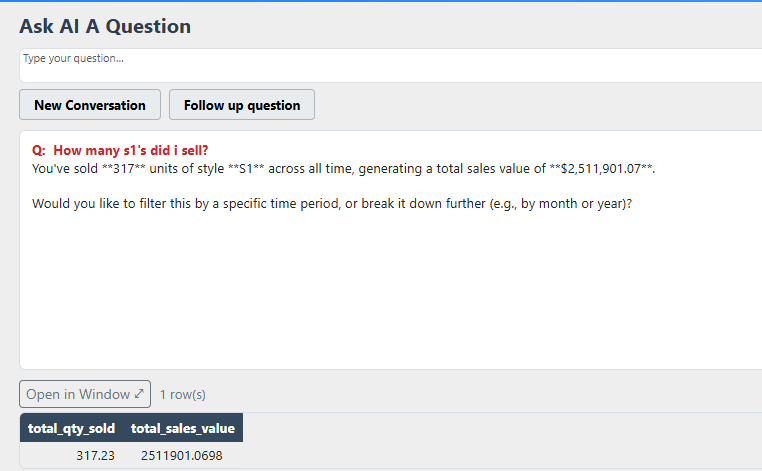
Notice two things. First, Ask AI wrote out the answer in a sentence — not just a grid you still have to read. Second, it returned the underlying data row underneath, so the number is auditable. You can open it in its own window if you want to work with it.
Step 2 — Follow up
This is where it stops feeling like a report. You don't re-enter anything — you just keep the conversation going:
"Break it down by the year and show me $ amount of sales and profit."
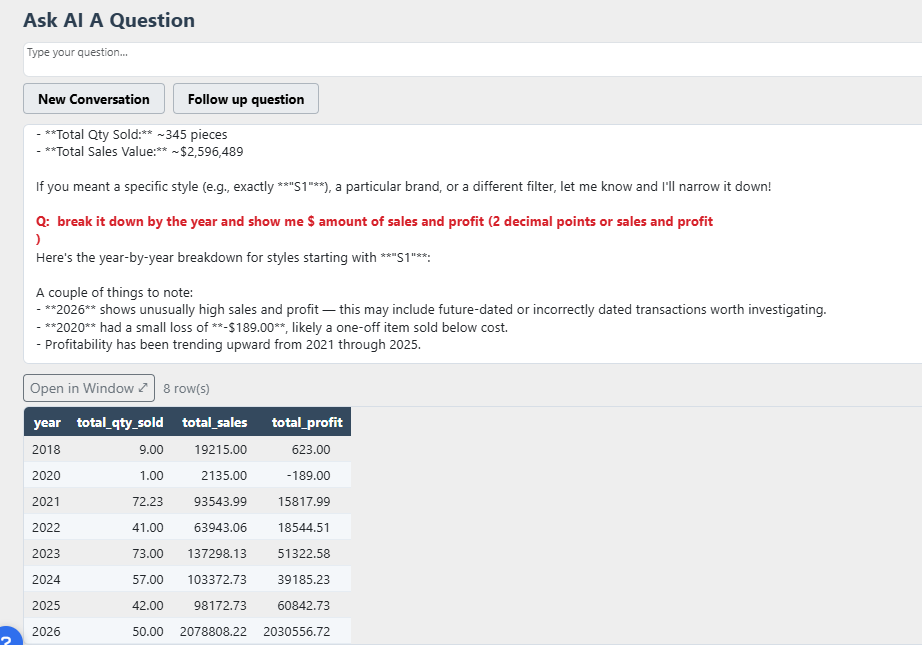
Ask AI remembered what "it" meant and returned eight years of sales and profit. But look at what it added on its own, without being asked:
- It flagged that 2026 shows unusually high sales and profit — possibly future-dated or incorrectly dated transactions worth investigating.
- It noticed 2020 carried a small loss of −$189.00, likely a one-off item sold below cost.
- It pointed out that profitability has trended upward from 2021 through 2025.
That last part is the real difference. A report hands you a grid and leaves the interpretation to you. Ask AI reads the grid back and tells you which rows look wrong — which is usually the reason you ran the report in the first place.
Typos Are Fine
You don't have to be careful with it. Misspell a style, shorten a word, skip the apostrophe or the punctuation entirely — Ask AI is good at working out what you meant. In the screenshot above the question was typed as "how many s1's did i sell", lowercase and unpunctuated, and it found the style anyway. If a question really is ambiguous, it says so and asks you to narrow it down rather than guessing silently.
What People Are Asking It
Because Ask AI sits on your live database, it understands the vocabulary of the jewelry business — styles, SKUs, metals, karats, stones, vendors, memos, repairs, and customers. The questions that come up most:
- "What hasn't sold in over a year?" — instead of the Inventory Aging report filtered by date.
- "How did last month compare to the same month last year?" — instead of a Sales by Category report plus a manual comparison.
- "Who are my top 20 customers this year, and which haven't bought in six months?" — instead of exporting a customer list and sorting it in Excel.
- "Which vendor gives me the best margin?" — instead of a margin report you reconcile by vendor.
There's a fuller walkthrough of a multi-step session in our earlier post, Ask Your Business Anything in Plain English.
Built In, Not Bolted On
An AI is only as useful as the data it can see. Ask AI isn't a separate tool you connect to WJewel — it's part of the same all-in-one platform that already runs your POS, inventory, repairs, CRM, e-commerce, and QuickBooks accounting. Because it all lives in one database, a single answer can span a customer's purchases, repairs, and memo history at once, instead of a slice you have to stitch together yourself.
It reads only your own store's records, and it honors the user permissions you've already set. There's nothing new to lock down.
Quick Answers
Does this replace my reports?
No. It's a faster front door to the same data. Your reports stay for formatted documents you need to print or send; Ask AI covers the hundred quick questions in between that never justified building a report.
Do I need any technical skill?
None. If you can ask a question in everyday English, you can use it. There's nothing to configure or script.
Is it live data?
Yes. Answers come straight from your own WJewel database in real time — not a sample and not an overnight copy.
Is my data private?
Yes. Ask AI only accesses your own store's records and respects your existing user permissions.
See It on Your Own Data
Ask AI is available now, and we're offering it at a low introductory price while it's new. The fastest way to judge it is to point it at your own store and ask it a few of the questions you'd normally put off until month end.
About the author
Javid Ishal · Architect of WJewel
Javid Ishal is the architect of WJewel and a cum laude graduate of Columbia University. He has advised jewelry businesses on operations and software since 1987, including work with brands such as Gabriel & Co., Effy and Imagine Bridal.
More from the blog
Related WJewel pages
- Jewelry Business Software One platform covering POS, CRM, inventory, repairs, accounting, manufacturing and wholesale.
- Jewelry Retail Software The full retail platform: POS, CRM, appraisals, custom orders and store management in one system.
- Book a Free Demo See WJewel running on your own workflow. 30 minutes, no obligation.
- Pricing Plans from $99/month. No setup fees, no long-term contract, 30-day free trial.
About WJewel: WJewel is jewelry POS and business management software for retailers, wholesalers and manufacturers. It covers point of sale, jewelry inventory with metal and stone details, repair and custom-order tracking, memo and consignment, CRM, RFID, manufacturing, and full accounting with QuickBooks integration, and runs in any browser on PC, Mac, iPad, tablets and phones. Built and supported by Ishal Inc. in New York since 1987. Read customer reviews or see the FAQ.
Published: · Last updated: