A Jewelry POS System That Knows Your Business

A generic retail POS can sell a t-shirt. It can't price by metal weight, accept a trade-in against a new purchase, or hand a repair ticket to the bench with photos and a deposit. WJewel's jewelry POS system handles all of it natively — and it's been refined by working jewelers since 1987.

Built for Jewelers

Trade-ins, layaways, memo, special orders, repairs, and appraisals — every jewelry workflow is on the main screen, not buried in a custom field.

Fast at the Counter

Ring up a sale in seconds. Scan tags by RFID or barcode, look up customers by phone, and email a receipt automatically.

All in One System

POS, CRM, repair tracking, inventory, accounting, and reporting in a single platform — not five tools that almost talk to each other.

What Your Staff Can Do at the Register

Every common jewelry transaction — and the not-so-common ones — handled from one screen.

Sales & Returns

  • Scan or look up items by SKU, style, or certificate
  • Apply discounts at line or ticket level with reason codes
  • Split tenders across cash, credit, gift card, and store credit
  • Process returns and exchanges against the original sale
  • Print, email, or text the receipt
  • Capture customer signature on screen for high-ticket items

Repairs & Custom Orders

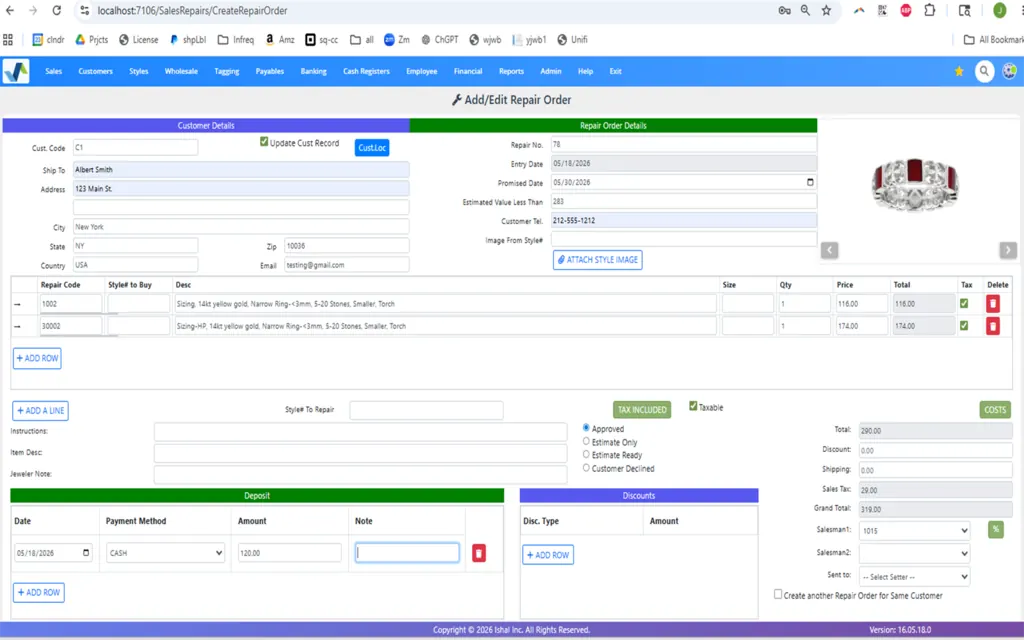
  • Take in a repair with photos, customer notes, and a deposit
  • Print job bag with barcode, description, and target date
  • Track status: received, in shop, complete, ready for pickup
  • Auto-text the customer when status changes
  • Custom orders with sketches, deposits, and milestone updates
  • Charge final balance at pickup with full history attached

Layaways, Trade-Ins & Memo

  • Layaway with custom payment plans and auto-reminders
  • Accept trade-ins, value by metal weight or stone, apply to purchase
  • Issue memo to customers — track loan, due date, and reminders
  • Receive memo from vendors and convert to invoice on sale
  • Special orders against vendor catalogs with deposit tracking

CRM at the Counter

  • Look up a customer by name, phone, or email in one click
  • See full purchase, repair, appraisal, and memo history
  • Link family accounts (spouse, parents, children)
  • Set follow-up reminders for anniversaries and birthdays
  • Loyalty points and store credit balance visible on the ticket
  • Capture marketing opt-in for SMS and email

Payments, Tax & Compliance — Done Right

A jewelry POS handles serious money. WJewel keeps your transactions EMV-compliant, your tax setup multi-jurisdiction-aware, and your records audit-ready.

  • EMV chip and contactless processing through certified providers.
  • Sales tax handled per location, including Avalara and TaxJar integrations for nexus rules.
  • FinCEN Form 8300 tracking for cash transactions over $10,000.
  • Per-user permissions — limit who can void, refund, or override price.
  • End-of-day cash reconciliation by drawer and by salesperson.
  • Full audit log of every change to every ticket.
Talk to Sales

Reports That Actually Help You Run the Store

  • Sales by salesperson, register, vendor, category, or day part.
  • Daily Z-report and end-of-day cash drop with one click.
  • GMROI, sell-through, and turn — per category and vendor.
  • Repair-shop throughput, aging, and pickup compliance.
  • Loyalty redemption and store-credit liability.
  • Email or schedule any report to owners and managers.

Hardware That Just Works

Run WJewel on the equipment you have — or let us quote a complete jewelry POS hardware bundle for your store.

Runs On Your Devices

PC, Mac, iPad, and Android tablet. Web browser or installed app — your call. Use existing hardware to start, upgrade as you grow.

Tag Printers & Scanners

Direct support for jewelry barcode and RFID tag printers, handheld scanners, label rolls, and dustless ribbons. See packages.

Receipt & Drawer

Thermal receipt printers, cash drawers, customer-facing displays, and signature pads — all configurable from WJewel settings.

One Store or a Whole Chain — Same POS

A small jeweler can run WJewel on one register. A multi-location chain can run real-time inventory, transfers, and consolidated reporting across every store. Same software, same training, same support.

  • Real-time stock visibility across all locations.
  • One-click cross-store transfers with audit trail.
  • Per-store pricing, taxes, and staff permissions.
  • Shared customer list and loyalty across the chain.
  • HQ reporting on sales, stock, and repairs across every store.
See Retail Solution
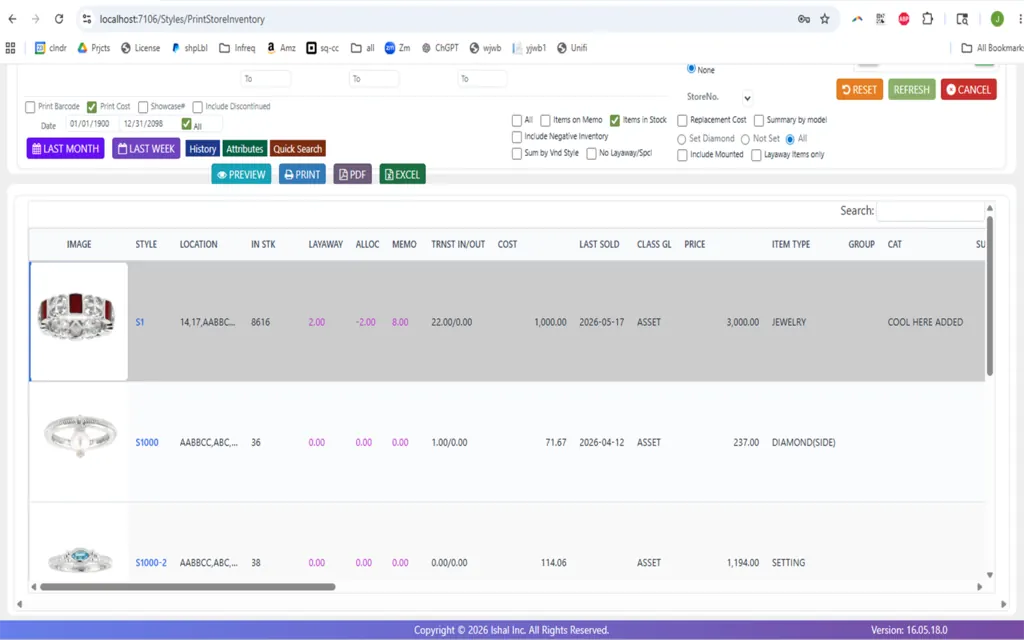
WJewel multi-store jewelry POS dashboard

Generic POS vs. Jewelry-Specific POS

Square, Lightspeed, and Shopify POS are great for boutiques. They're not built for the workflows a jewelry store sees every day.

Generic Retail POS WJewel Jewelry POS
Trade-in valuation by metal weight Manual workaround Native, with live metal pricing
Repair intake at register Not supported Full ticket, photos, deposit, status SMS
Layaway with payment plans Add-on or none Built in, with auto-reminders
Memo to customer / from vendor Not supported Both directions, fully tracked
Diamond cert (GIA/IGI/EGL) on item Custom field First-class, searchable
FinCEN $10K cash tracking Manual Built-in alert and form
RFID inventory audits No Yes — tags, readers, software
Made for jewelers No Since 1987

Jewelry POS System — Common Questions

What does a jewelry POS system actually do that Square or Shopify POS can't?

A jewelry POS handles workflows that generic retail systems either don't support or fake with custom fields: trade-in valuation by metal weight and stone, repair intake with deposits and photos, layaways with payment plans, memo (both vendor consignment and customer take-home), special orders against vendor catalogs, diamond certificate tracking, and FinCEN $10K cash reporting. WJewel was designed for these from day one.

How long does it take to learn the jewelry POS?

Sales associates are confident at the register within a couple of days. Deeper functions (reporting, accounting, multi-store transfers, RFID audits) typically take 2–4 weeks of regular use. Unlimited training is included — no hour caps, no extra fees — and we re-train new hires whenever you bring them on.

Does WJewel POS work with my existing payment processor?

Yes. WJewel integrates with the major EMV-certified processors in the US, so you can keep your current rates if you're happy with them — or we can introduce you to processors that specialize in jewelry merchants. Chip, contactless, and split-tender are all supported at the register.

Can I use my own hardware, or do I have to buy yours?

Either. WJewel runs on PC, Mac, iPad, and Android tablets, and works with most thermal receipt printers, cash drawers, barcode scanners, and signature pads. We can also quote a complete bundle — POS terminal, jewelry tag printer (barcode or RFID), scanner, drawer, and processing — and ship it ready to go.

How is repair tracking handled at the register?

A repair is just another transaction type. Take photos, capture customer notes, set a target date, take a deposit, and print a job bag with a barcode — all from the POS. The bench picks it up by scanning the bag, and status changes auto-text the customer. At pickup, the system charges the balance and closes the ticket.

Does it work for multi-store jewelry chains?

Yes. Real-time inventory across locations, cross-store transfers, store-level pricing and permissions, shared customer database, and consolidated reporting. Each store gets its own receipt layout, tax setup, and staff while sharing the same backbone.

Will WJewel POS sync with my website?

Yes. Bidirectional sync with Shopify, BigCommerce, Magento, and custom websites. A sale at the register reduces web stock; a web order shows up at your POS for fulfillment with shipping label generation. We also build custom jewelry websites if you need one.

Is there a free trial?

Yes. Start a free trial with your real data so you can test it the way you actually work.

See all frequently asked questions ›
See the Jewelry POS in Action

Watch a demo, start a free trial, or schedule a call. No contract, no pressure — just unlimited training and support while you decide.

Prefer to talk? Schedule a meeting or call (646) 578-8300.

Get In Touch

Please, let us know the best time to contact you by phone (if provided).
Contact WJewel support