Trusted by Leading Jewelry Retailers

Used by hundreds of jewelers across North America and beyond — independents, multi-store chains, wholesalers, and manufacturers.

2024 awards: Capterra Best Value, Software Advice Most Recommended and Best Customer Support, GetApp Best Functionality and Features. Read what jewelers say on Capterra.

Steven Singer Jewelers – WJewel jewelry store software client
Glennpeter Jewelers – WJewel jewelry store software client
Leo Hamel Fine Jewelers – WJewel jewelry store software client
Azadi Jewellery – WJewel jewelry store software client
Sparkles Jewelry – WJewel jewelry store software client
Crisson Jewellers – WJewel jewelry store software client
RK Jewels – WJewel jewelry store software client
Shiva Jewelers – WJewel jewelry store software client
Joseph Jacob Jewelers – WJewel jewelry store software client
Birkat Elyon – WJewel jewelry store software client
Why WJewel

Why Jewelers Choose WJewel Over Generic POS Systems

A general retail POS is built to sell items off a shelf. A jewelry store also takes in repairs, lends pieces on memo, buys gold and sells one-of-a-kind pieces, and it shouldn’t need five programs to do it. WJewel is jewelry store software that runs all of it in one system.

What a general retail POS is built for, next to what WJewel does for a jewelry store
AreaBuilt for general retailWJewel, built for jewelers
InventoryAn item with a SKU, a price and a quantityEach piece with its metal, karat, stones, weight, certificate number and picture
At the registerSales and returnsSales, returns, trade-ins, layaways, memos and special orders, at the same register
RepairsBuilt around the sale, not the repair jobRepair tickets from intake to pickup, with photos, job bag tags and updates to the customer
Tags & countsStandard barcode labelsJewelry tags, barcode or RFID, and a whole case counted with an RFID reader in seconds
ReportsSales reportsSell-through, GMROI and aged stock, plus demand forecasting that suggests how many of each style to order
CustomersA customer listPurchase history, follow-up alerts, linked family accounts, a customer portal and text-to-pay links
AccountingOften left to a separate programVendor bills, checks, bank downloads and a QuickBooks sync, in the same system

A general retail POS does what it was built for. The difference is everything a jewelry store does besides ringing up a sale, from jewelry inventory management to jewelry repair tracking.

The actual software

See the screens your staff will use.

These are real WJewel screens, from the sales floor to the back office.

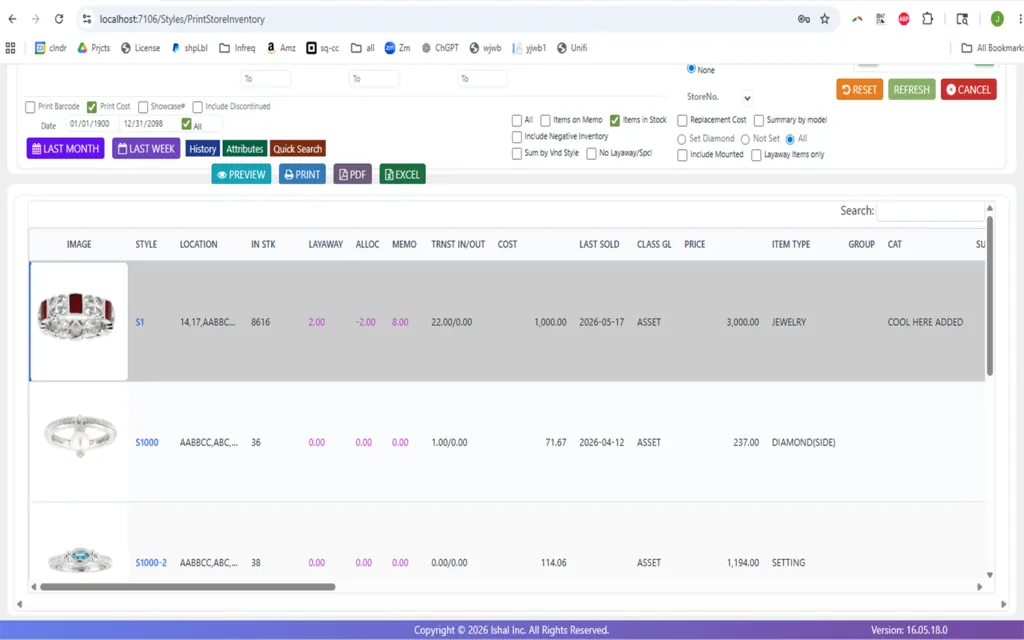
WJewel inventory list by style with pictures, location, stock, layaway, memo, cost, last sold date and price

Know your stock

Jewelry inventory

Every style with its picture, where it is, what is in stock, on layaway or out on memo, its cost, when it last sold and its price. You stop guessing what is in the case.

  • Serial numbers, metals, stones, tags and RFID
  • Vendor memos and transfers between stores
Jewelry inventory software →

One App to Run Your Whole Jewelry Store

From POS to stock and CRM, WJewel does it all. Plug in tag printing and RFID with one click.
Running a specialty store? See WJewel for Indian jewelry stores (22K gold rates, kitty plans, bullion), pawn shops, gold buying, watches and consignment.

Point of Sale

Point of Sale (POS)

  • Ring up sales, returns, repairs, and trade-ins.
  • Save buyer name, phone, and email fast.
  • Pull sales tax reports in one click.
  • Text or email a link so customers pay by card.
Inventory

Inventory

  • Track stock across all your stores.
  • Auto-reorder low stock items.
  • Let vendors view their items online.
  • Scan barcodes with your phone’s camera.
Repair Orders

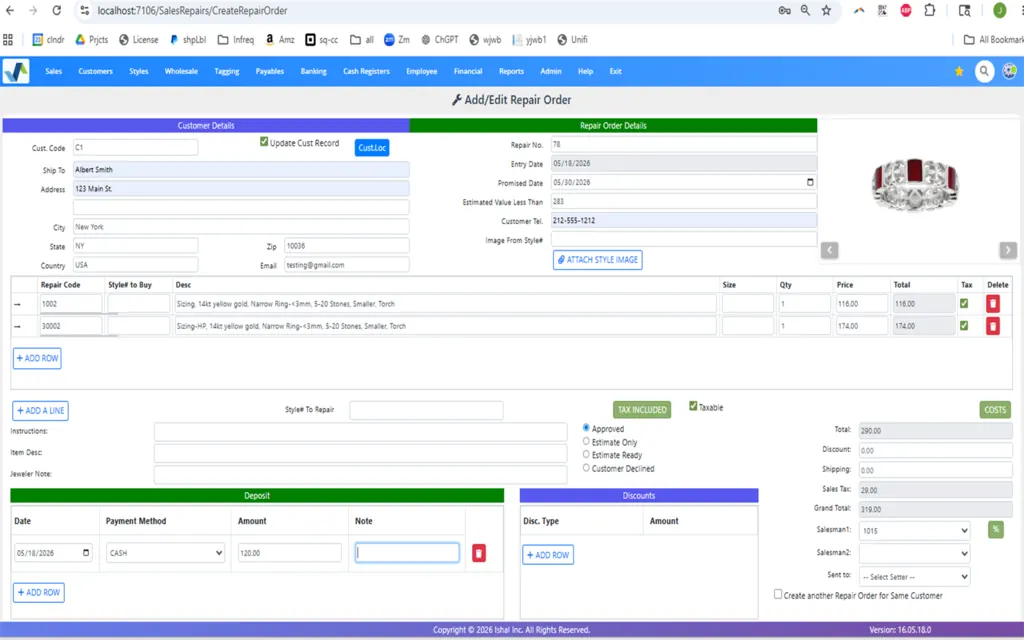
Repair Orders

  • Keep track of each repair.
  • Snap photos of each repair.
  • Tag job bags from store to shop.
CRM

CRM

  • Handle sales, returns, and gift cards.
  • Set follow-up alerts per buyer.
  • Link family accounts with ease.
  • Give customers an online portal for their account.
Accounting

Accounting

  • Cut checks and send vendor bills.
  • Sync with QuickBooks fast.
  • Track purchases, received merchandise, and vendor memos.
  • Download bank transactions to reconcile.
Additional Features

And Even More

  • Auto-sync to Shopify and your site.
  • Scan tags with RFID or barcodes.
  • Email, fax, or send reports to Excel.
  • Set who can do what.
  • Schedule statements and reports to send themselves.
  • Connect other software through the WJewel API.
Just released

New in WJewel

The latest additions to WJewel for jewelry stores — get paid faster, give customers a window into their account, and work from any device.

  • A.I. Model Photos

    Turn a style’s product picture into a realistic photo of the piece being worn — on a hand, at the neckline, on an ear or a wrist — for your website and social media, without a photo shoot. See A.I. model photos · Watch the 1-minute video

  • A.I. Reads Your Vendor Invoices

    Attach a vendor’s invoice to a new bill — a PDF, a scan or a phone photo — and A.I. reads it, checks that it adds up, and types the invoice number, terms, charges and every line into the bill for you. See the vendor invoice reader

  • Compare Styles Side by Side

    Set two or three pieces on the RFID tray, or scan their tags, and a tablet shows them side by side — pictures, price, carat, color, clarity and cut, with the differences highlighted for the customer. Watch the 1-minute video

  • Shopify Stock, Points and Gift Cards

    Stock counts go to your Shopify store every hour, online orders earn loyalty points, customers spend points online, gift cards work in the store and on your site, and Google shows “in stock at your store.”

  • Self Check-In Tablet

    Customers check in on a tablet at your counter, fill in their own details for a repair, review the price and balance due, and sign on screen. See how self check-in works

  • Text-to-Pay Links

    Text or email a customer a secure payment link and they pay by credit card from their phone — no reading card numbers over the phone.

  • Customer Portal

    Your customers check their statement, open layaways, repairs and special orders — and make payments — any time, from any device. See how the customer portal works

  • Ask AI

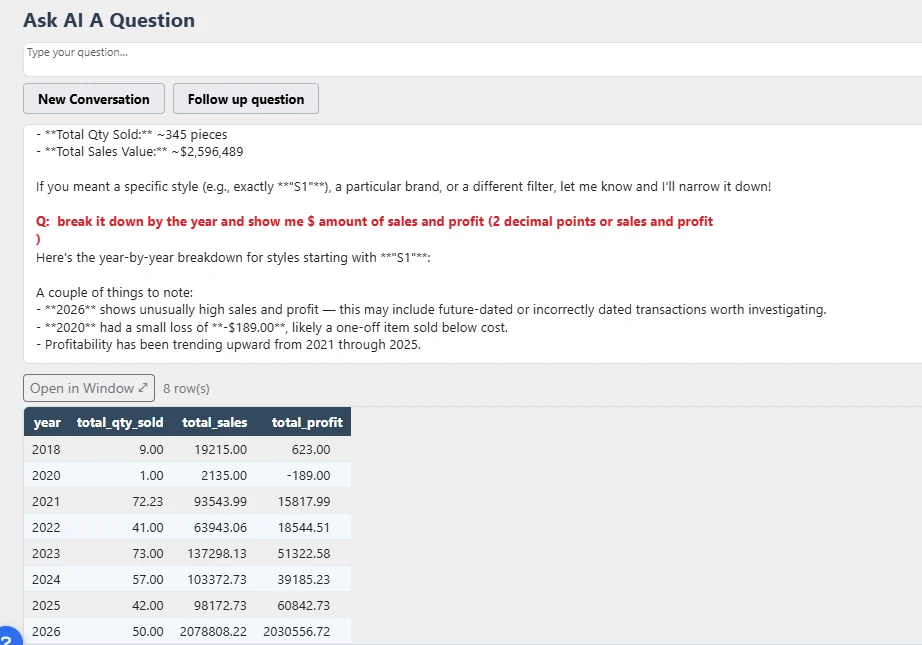
    Ask about your store in plain English — “what hasn’t sold in over a year?” — and get the answer from your live data in seconds.

  • Stuller API Integration

    Download Stuller’s products, diamonds, lab-grown diamonds and gemstones into WJewel, and fill in a style’s description, cost, retail price, metal weight and pictures straight from its Stuller SKU.

November’s new features ›·October’s new features ›

Demand Forecasting: Know What to Buy Before You Buy It

The buy is the largest cash decision a retail jeweler makes all year, and most of it gets made from memory. WJewel's built-in demand forecasting projects what is likely to sell — by style, by category, by vendor — from your own sales history, so every order is placed against real numbers instead of a hunch.

  • Forecast by style, category, or vendor over whatever period you are buying for.
  • Suggested order quantities — see how many of each style to order to cover what you expect to sell.
  • Plan the seasonal buy — bridal, gift, holiday — before vendor inventory is committed.
  • Reorder fast movers early enough to matter, instead of after the case is already empty.
  • Spot the lines heading for aged stock before you write the next PO for them.
  • Break it down by price band, so the gift business and the bridal business each get their own plan.
  • Compare the forecast to what actually sold, then carry the lesson into next season.
See Forecasting in a Seasonal Buy

Two Ways to Get a Forecast

  • The forecasting screen. Pick the period and the level — style, category, or vendor — and read the projection alongside the history it is built from.
  • Ask AI. Type the question the way you would say it: "what should I order for December in bridal" or "which vendors sold through best last holiday" — and get the answer back in seconds.
  • Both run on your own live data. Nothing to export, no report to rebuild each season. More on WJewel’s AI jewelry software.

Manage All Your Jewelry Stores From One Place

Opening a second store, or running five? WJewel shows every location from one screen and keeps them in sync: one customer list, live stock for every store, and reports for one store or all of them.

  • View live stock across all your stores in one list.
  • Transfer items from one store to another in a few clicks.
  • Track each piece by location, bin, or sales rep.
  • Find a style fast: see which store has it in stock.
  • Roll up sales, stock, and repairs for all your stores.
  • Set per-store prices, taxes, and staff access.
  • Share one buyer list and loyalty program across stores.
  • Back office, HQ, and shop floor all use the same data.

Smart Transfers Between Stores

Move a ring from Store A to Store B in one click. The system logs the move and updates stock at both ends right away.

  • Scan items with RFID or bar code to speed up moves.
  • Print a transfer slip with pics and bar codes.
  • Track items in transit until the other store gets them.
  • See the full move history per piece.

The Same Program in Every Store

  • Unlimited users, each with only the access you give them.
  • Multi-site backup and fast sync.
  • Runs on PC, Mac, iPad, tablets and phones.
  • Pulls reports for one store or all of them.
From jewelry businesses

What jewelry stores say about WJewel.

From verified reviews of WJewel on Capterra.

“WJewel covers everything we need to run our jewelry store in one system — invoicing, repair orders, inventory, scrap gold buying, and full accounting (AP/GL) without needing separate software. … It’s clearly built by people who understand the jewelry trade — things like karat/metal tracking, style-level costing, and repair workflows work the way a real store operates, not like a generic retail POS with jewelry features bolted on.”

Antoine D.Director, jewelry business (11–50 employees) · Capterra, July 2026

“The software has some really nice features to manage memo and consignment in Retail Jewelry. Also, it has nice office automation tools to record recurring APs. Gold purchases are a breeze. … If we have a problem, the developer fixes it. They are happy to make the software do what we need it to do.”

ScottGlennPeter Jewelers

“As a small custom design and jewelry repair shop we have pretty unique needs and we were stuggling to find a solution out of the box. We came across wJewel and signed up for a free demo and knew we’d found our answer. … Today, we are printing our shop jobs on 4x6 index cards and using reusable job envelopes. This feature alone has saved us from having to order/stock custom job envelopes and from hand writing repair jobs!”

OwnerCustom design and jewelry repair shop · Capterra, July 2022

“We are a really small shop and at first we were worried we would not be able to use all the system has to offer. The team at wJewel made sure we got onboarded, learned (helpful videos!), and have answered every single question and resolved any issues we’ve had.”

Sales and OperationsVerified reviewer, small jewelry shop · Capterra, May 2024

“The Software performs excellent in managing our inventory, customer data base. … They are very quick to respond to any requests to software modifications and hardware conflict resolutions.”

Joseph A.President, retail (2–10 employees) · Capterra, June 2024

“great people to work with. always willing to help if you need it. and i especially like how they will customize and tweak the program to make it do things i would like it to do specifically for me … simple to learn and use. great value for the money”

John O.Owner, retail jeweler, 3–5 years on WJewel · Capterra, March 2021
Capterra rating 4.8 out of 5

4.8 out of 5 from 73 verified reviews on Capterra
Ease of use 4.8 · Customer service 4.9 · Read the reviews

WJewel on GetApp WJewel on Software Advice Capterra Best Value 2024 badge Software Advice Most Recommended 2024 badge Software Advice Best Customer Support 2024 badge GetApp Best Functionality and Features 2024 badge

Read more from our customers →

Moving from another system

Switching jewelry software doesn’t have to be difficult.

The worry is rarely the new software. It is years of inventory, customer history and open layaways in the old one. Our team does the move for you.

  1. We look at what you have

    A live demo with your own questions, and a review of your current data together: what carries over, what needs cleaning and what is better left behind.

  2. We move your data

    Inventory, customers, vendors, open layaways and repair history, from The Edge, Jewelry Shopkeeper, JewelMate, Lightspeed, Business Mind, QuickBooks and others. We take CSV, Excel, VFP and SQL backups and QuickBooks exports, and our team handles the mapping, so nothing is re-entered by hand.

  3. We set you up

    Your account, tag and receipt layouts and hardware, set up for the way your store or office works.

  4. You go live, trained

    Up and running in 1 business day with no data to import, or up to 7 business days when we import it. Training is unlimited, and support is there 365 days a year.

Setting up, in their words

“We have been in the jewelry industry for over 25 years, and tried 2 other software packages before switching to this software. Ease of use and customer support are amazing, Software was designed by people who know the jewelry industry inside out, we did not have to adapt to the software, the software adapted to our needs.”

OwnerVerified reviewer · Capterra, January 2012

“Professional and quick. Explained the process and I had to do nothing. They took over the system and did all the work.”

OwnerVerified reviewer · Capterra, October 2025
  • Setup and data migration included
  • No long-term contract
  • Unlimited training

How to switch jewelry POS systems · Coming from The Edge · Coming from Jewel360

We integrate with

Shopify
QuickBooks
Rapnet
GIA
Stuller API integration
EGL
AGS
IGI
Buyers Intelligence Group
SellBrite
eBay
FedEx
UPS
ParcelPro
Avalara
TaxJar
Jewelers Mutual
Podium reviews and messaging

Plus Geller Blue Book repair & custom-work pricing and Jewelers Mutual insurance — supported right inside the POS. See all integrations →

Jewelry Retail Software — Questions Jewelers Ask

How much training is included for my retail staff?

Unlimited training, included. No hour caps, no extra fees. We train live over Zoom, record sessions, and train new hires whenever you bring them on. Sales associates are confident at the register within a couple of days. Deeper features (reporting, accounting, multi-store transfers, RFID audits) typically take 2–4 weeks of regular use.

Will you help me get the hardware I need for my store?

Yes. We recommend and quote the exact hardware for your store — POS terminals, receipt printers, jewelry tag printers (barcode or RFID), cash drawers, barcode scanners, RFID readers, and card processing. Buy directly from us or source it yourself, whichever you prefer.

Can WJewel handle custom and made-to-order jewelry?

Yes — custom and made-to-order is a core workflow, not an add-on. Create a work order with customer specs, stones/metals required, target completion date, attached sketches or photos, deposit tracking, and status updates (design → casting → setting → polishing → ready). Automated text and email alerts keep the customer informed. Repairs and appraisals use the same system with their own ticket templates.

Does WJewel track memos — from vendors and to customers?

Yes, both directions. Memo in from vendors: track consignments received from estate dealers, diamond suppliers, or other jewelers, with item-level detail, aging, partial returns, and conversion from memo to invoice when a piece sells. Memo out to customers: let a customer take a piece home to show a spouse or consider the purchase — WJewel tracks the loan, due date, and automated reminders, and protects you with full accountability. Full reporting by customer, vendor, or age.

How does jewelry POS software improve inventory control?

A jewelry-specific POS tracks each item at SKU level — metal, karat, stone, weight, certificate number (GIA, IGI, EGL), cost, and location — so you always know exactly what you have. You get real-time sell-through data, cycle counts and full audits (especially fast with RFID), automatic low-stock alerts, vendor reordering suggestions, and full history per piece. The result: less shrinkage, fewer phantom-inventory sales, and smarter buying decisions.

Does WJewel integrate with my website?

Yes. WJewel integrates with Shopify, WooCommerce, Magento, and custom-built websites — your styles, prices, and pictures go to your online store, and online orders come back into WJewel for fulfillment, with the buyer added to your customers. With Shopify, WJewel sends your stock counts every hour, less what is on layaway or waiting to be picked up; only the counts that changed are sent, so a piece that just sold online is never put back on sale before its order reaches WJewel. Online orders earn loyalty points, and gift cards work in the store and on your site. If you don't have a website yet, we also build custom jewelry websites.

Can my customers see their account and pay online?

Yes. With the WJewel customer portal, your customers can check their statement, open layaways, repairs and special orders, and make payments any time, from any device. You can also text or email a customer a secure payment link, and they pay by credit card from their phone.

Does WJewel have an API?

Yes. The WJewel API lets your website, CRM or other software work with WJewel directly — for example to add new customers or look up inventory. Tell us what you want to connect.

Do you offer a free trial?

Yes — 30 days. We want you fully comfortable before you commit. A card is required to start, but it is not charged for the first 30 days as long as you cancel before then. Start your free trial.

See all frequently asked questions ›

See how WJewel would work in your store.

Leave your name, email and number. We’ll set up a personal demo of the features that matter to your store, using your own questions and the way you work today.

Rather try it yourself? Start your 30-day free trial (a card is needed to start; it is not charged for the first 30 days as long as you cancel before then) · Watch the demo video Prefer to talk? Call (646) 578-8300 · Make an appointment

Published: · Last updated: