Watch a Pawn Loan, Start to Finish

Under two minutes, recorded in the program with a made-up customer: the loan, the pledged pieces, the pawn ticket, pickup and the reports.

Pawn Shop Software Features

Everything under one menu: Banking › Pawn Shop Loans.

Pawn Loans in Seconds

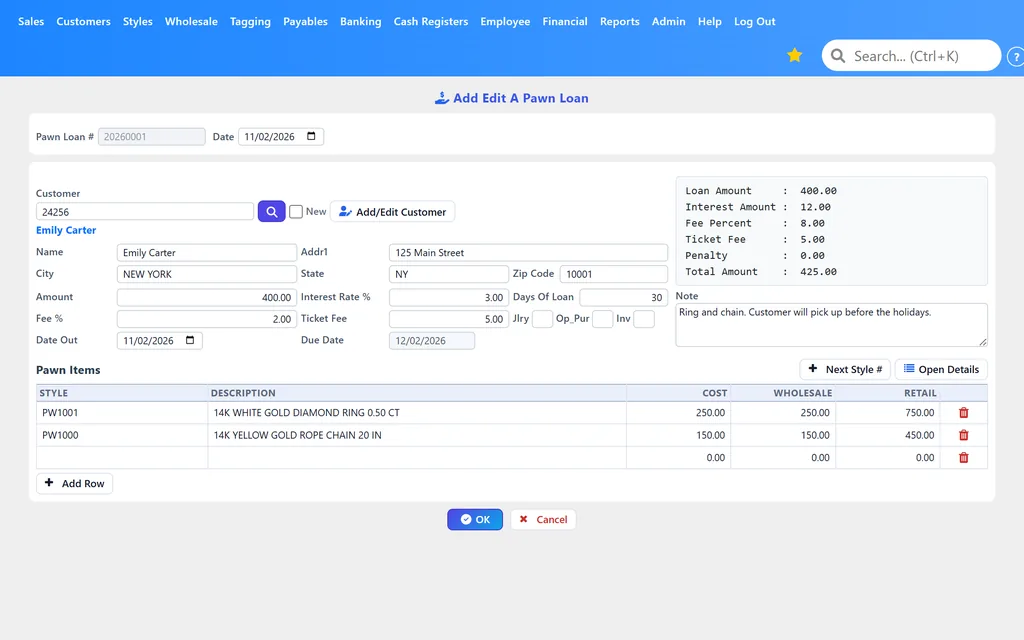
  • The next loan number is filled in for you
  • Default days of loan, interest rate, ticket fee, loan fee % (with a maximum loan fee) and late fine, set once
  • Due date worked out from the date out and the days of loan
  • Interest, fees and total shown as you type
  • A note on every loan

Customer ID on Every Loan

  • A loan is saved only when the customer has name, address, date of birth, phone, ID number and state, gender and race on file
  • Missing details? WJewel offers to open the customer and fill them in
  • Add a new customer by scanning their driver's license
  • The ID details print on the pawn ticket

Every Pledged Piece, Itemized

  • Each piece gets its own item number (Next Style #), never one already in stock or on another loan
  • Metal, karat, category, brand, model, and up to two stone lines (shape, carat weight, color)
  • Serial number, owner-applied number and engraving
  • Cost, wholesale and retail price for each piece
  • The pieces can't cost more than the loan amount

Printed Pawn Tickets

  • The loan agreement: your store, the customer and their ID, the pledged pieces
  • Days of loan, amount financed, finance charge, total of payments and maturity date
  • Preview, print, PDF, email or Excel
  • Reprint any loan's ticket, including pickup tickets

Pickups, Prepayments & Extensions

  • Pickup: the balance with interest and fees owed, paid in full
  • PrePayment: part of the balance, with a ticket showing what's still owed
  • Extend: pay what's due and start a new loan for the rest
  • A discount on fees and interest at pickup when you choose to give one
  • Payments and penalties on their own, each with a receipt

Interest, Penalties & Defaults

  • Calculate finance charges for any date range
  • Add a penalty to a loan
  • Change the interest rate on an open loan
  • Mark loans as in default from one list of open loans, with balances and last payment dates

Pawn Reports

  • List of pawn loan balances, open loans or all
  • Statement of a pawn loan: every payment, interest charge and penalty
  • Pawn monthly report: amount loaned, fees, interest, principal paid and defaults by month, with the loans behind each month
  • Print, PDF, email or Excel

Posted to Your Books

  • G/L accounts for loans made, payments, interest and penalties, chosen once
  • Every loan, payment, interest charge and penalty posts to WJewel's built-in general ledger
  • A loan with payments, a pickup or an extension can't be deleted
  • Unlimited users, with permissions for each user

See the Pawn Screens

A printed WJewel pawn ticket with the customer's ID and the pledged pieces
The pawn ticket, with the customer's ID and every pledged piece
WJewel Pawn Loan Pickup screen showing interest, fees and the balance
Pickup: interest and fees owed, and the balance
WJewel Mark Pawn Loan as In Default list of open pawn loans
Open loans, ready to mark as in default

How a Pawn Loan Works in WJewel

  1. Set your terms once. In Default Values For Pawn Loan, enter your days of loan, interest rate, ticket fee, loan fee % and maximum, and late fine.
  2. Make the loan. Pick the customer (or scan their driver's license to add them), type the amount, and list each piece pledged. The due date, interest and fees fill in.
  3. Print the ticket. Click OK and print, PDF or email the pawn ticket. The loan posts to your general ledger.
  4. Take payments. Prepayments, payments, penalties and extensions, each with its ticket or receipt.
  5. Close it out. At pickup the customer pays the balance and takes their pieces home, or you mark the loan in default.

Pawn Loans and Your Jewelry Store, in One Program

WJewel is complete jewelry store software, so the rest of your counter is already there.

Buy Gold at Today's Price

Buying scrap gold gets the day's gold price for you: enter weight and karat, see what to offer, pay in cash, by check or as a trade-in.

Sell With a Jewelry POS

The jewelry POS handles split payments, layaways, trade-ins, special orders and repairs.

Inventory and Books

Jewelry inventory by metal, karat and stone, plus built-in accounting, bank downloads and QuickBooks export.

Pawn Shop Software FAQ

What is pawn shop software?

Pawn shop software records each pawn loan: the customer and their ID, the pieces pledged, the amount, interest and fees, and the due date. It prints the pawn ticket, takes payments, pickups and extensions, flags loans that go into default, and reports on what you have out on loan. In WJewel it is part of the same program that runs your jewelry store, so pawn loans sit next to your sales, inventory, repairs and accounting.

Does WJewel print pawn tickets?

Yes. Saving a loan prints the pawn ticket (loan agreement) with your store, the customer's name, address, ID number and state, date of birth and phone, every pledged piece, the days of the loan, the amount financed, the finance charge, the total of payments and the maturity date. Preview, print, save as PDF, email or export it, and reprint any loan's ticket later. Pickups, prepayments and extensions print their own tickets.

How are pawn loan interest and fees worked out?

You set the defaults once: days of loan, interest rate, ticket fee, loan fee percentage with a maximum loan fee, and a late fine. Each new loan starts with them, and you can change any of them on the loan. At pickup, WJewel adds the interest, the loan fee and the ticket fee for each loan period since the loan date, plus any penalties, less what has been paid. You can give a discount on the fees and interest at pickup, and change the interest rate on an open loan.

What happens when a pawn loan is not picked up?

Open Mark Pawn Loan as In Default, which lists your open loans with their balances and last payment date, and tick the ones in default. WJewel records the date each loan went into default, and the monthly report totals defaulted amounts by month. Each pledged piece already carries its own item number with its cost, wholesale and retail price.

Can a customer make a partial payment or extend a loan?

Yes. Pawn Loan PrePayment takes part of the balance and prints a ticket showing what is still owed. Extend Pawn Loan takes at least the interest and fees due and starts a new loan for the rest, with a new due date. You can also post payments and penalties on their own, each with a receipt.

Do pawn loans post to the general ledger?

Yes. Choose the debit and credit accounts once in G/L Codes For PawnLoan (loan made, payment, interest and penalty), and every loan, payment, interest charge and penalty posts to WJewel's built-in general ledger by itself. A loan that has payments, or was picked up or extended, cannot be deleted.

Does the pawn software run on a tablet or phone?

Yes. WJewel is cloud-based and runs in any web browser, on PCs, Macs, iPads and other tablets, and iPhones and Android phones. The pawn screens are part of the same program.

See Pawn Loans in WJewel

Try WJewel pawn shop software with your own loan terms. Free demo, 30-day free trial, and unlimited training included.

Prefer to talk? Schedule a meeting or call (646) 578-8300.

Published: · Last updated: