Gold Buying Software Features

From the offer at the counter to the lot at the refinery.

Today's Metal Prices

  • Gold, silver, platinum and palladium prices from the web, once a day or whenever you refresh
  • Daily metal prices kept for every date

Offers Worked Out for You

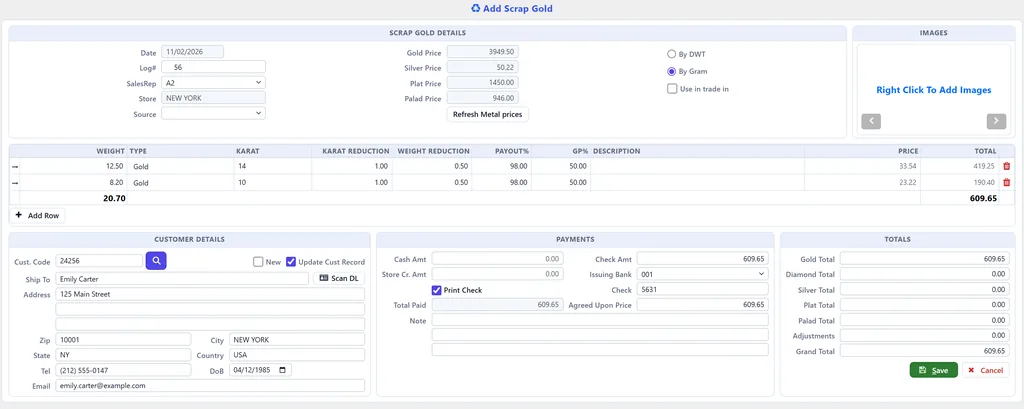
  • Weight by the gram or the pennyweight, type and karat on each line
  • Your karat reduction, weight reduction, payout % and gross profit %
  • Only your top-level users see the reductions and payout rates
  • Gold, silver, platinum, palladium and diamond totals
  • An agreed price and adjustments before you pay

Pay the Way the Seller Wants

  • Cash, a printed check, store credit, or a mix
  • Or use the gold as a trade-in on a purchase
  • A printed receipt for every purchase, and reprints any time

Know Who You Bought From

  • Scan the seller's driver's license: name, address, date of birth, license number and state
  • Pictures of what you bought
  • Log number, sales rep, store and source on every purchase

From Counter to Refinery

  • Mark purchase logs as received
  • Process scrap and trade-ins
  • Record each lot sent to the refinery by metal and karat, with its weights
  • Gold inventory: weight received and sent, by karat

Cash-Outs and Reports

  • Cash-outs for jewelry and watches you buy to resell, each piece by style number
  • List of scrap gold purchases and list of cash-outs
  • Every store, or one store at a time

CAPSS Reporting for California Dealers

California requires secondhand dealers to report what they buy to CAPSS, the Department of Justice's pawn and secondhand dealer system. WJewel sends it for you.

  • Your scrap gold purchase logs, and cash-outs if you choose, go to CAPSS through its bulk upload, with the seller's details from the customer record.
  • Logs that are ready are listed, and problems are shown before you send.
  • Every submission is kept with its status, and a log is never sent twice unless you choose to re-send a correction.
  • Weights go out in grams (pennyweight logs are converted) and diamond lines in carats.
  • CAPSS takes a transaction only while it is dated within the last 7 days, so report weekly or more often.

How a Gold Purchase Works in WJewel

  1. Open Add Scrap Gold. Today's metal prices are already there.
  2. Weigh it. Enter the weight and karat of each piece, and WJewel shows what to offer with your payout rates.
  3. Record the seller. Scan their driver's license and add pictures of what you bought.
  4. Pay. Cash, check, store credit or trade-in, with a printed receipt.
  5. Follow it through. Mark it received, process it, send it to the refinery, and report it to CAPSS if you are in California.

Gold Buying and Your Jewelry Store, in One Program

Jewelry POS

Use the gold toward a sale at the jewelry POS, with layaways, special orders and repairs.

Pawn Loans

Lend against gold, jewelry and watches with pawn shop software, pawn tickets included.

Pre-Owned Watches

Serial numbers, box and papers and full watch details with watch store software.

Gold Buying Software FAQ

How does WJewel work out what to pay for gold?

The program gets the day's gold, silver, platinum and palladium prices from the web (the first purchase of the day asks to, and Refresh Metal prices gets them again). For each line, enter the weight, by the gram or the pennyweight, and the karat. Your karat reduction, weight reduction, payout percentage and gross profit percentage are applied, and WJewel shows the price per unit and the total to offer. Change the agreed price or add an adjustment before you pay.

How can I pay the seller?

In cash, by check (WJewel prints the check, with the issuing bank and check number), as store credit, or any mix of them. Or tick Use in trade in and the gold goes toward something the customer is buying.

What does WJewel record about the seller?

Their name, address, phone, email and date of birth, filled in by scanning their driver's license, which also saves the license number and issuing state. Each purchase gets its own log number, sales rep, store and source, and you can add pictures of what you bought.

Does WJewel report gold purchases to CAPSS in California?

Yes. CAPSS Reporting (CA DOJ) sends your scrap gold purchase logs, and cash-outs if you choose, to the California Department of Justice's pawn and secondhand dealer system through its bulk upload. It lists the logs that are ready, shows any problems before you send, keeps a history of every submission and its status, and never sends the same log twice unless you choose to re-send a correction. CAPSS takes a transaction only while it is dated within the last 7 days, so report weekly or more often.

Can I track gold from purchase to the refinery?

Yes. Mark purchase logs as received, process scrap and trade-ins, and record each lot sent to the refinery by metal and karat with its weights. The gold inventory report shows the weight received and sent, by karat.

Can I buy jewelry or watches to resell, not just scrap?

Yes. A cash-out records the pieces you bought from a customer, each by style number, and pays them by cash or check with a printed receipt.

Buy Gold With WJewel

Try WJewel gold buying software with your own payout rates. Free demo, 30-day free trial, and unlimited training included.

Prefer to talk? Schedule a meeting or call (646) 578-8300.

Published: · Last updated: