Watch a Consignment, Start to Finish

Under two minutes, recorded in WJewel with a made-up consignor: taking the pieces in, selling one, and the bill and check that pay the owner.

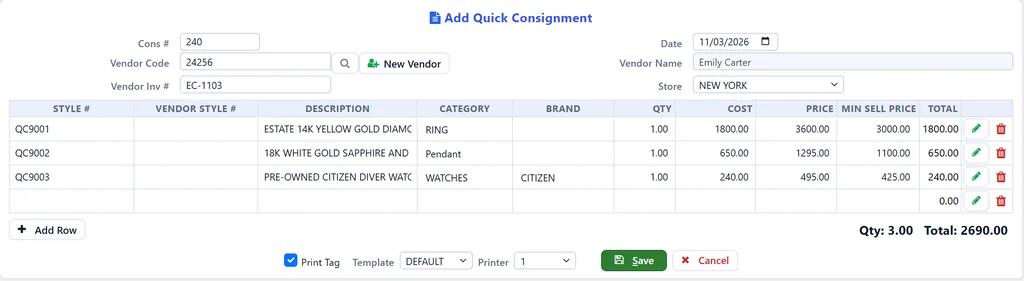
Add Quick Consignment

Log the pieces private sellers bring you on consignment, in a few quick steps.

Add the consignor. Scan a new consignor's driver's license to fill in their details, copy them from their customer record if they already shop with you, or type them in. You can also scan their ID and keep a copy on file.

Add the pieces. Enter each piece's details, take its picture, save, and print the tags. It is ready to go in the case.

Pay the owner. When a piece sells, WJewel shows you what sold from each consignor, so you can let the owner know and pay them.

Jewelry Consignment Software Features

Everything from the day a piece comes in to the day you pay its owner.

Consignors, Not Just Vendors

  • Take in pieces from private sellers, collectors, estates and small vendors
  • Scan a new consignor's driver's license, or copy an existing customer's details
  • Keep scanned pictures of the consignor's ID for later
  • Give each consignor payment terms, and their consignments get a due date

Kept Separate From Your Own Stock

  • Consigned pieces sit on your shelf and in your inventory, each under its consignment
  • Every consignment posts to your general ledger when you save it
  • For each style on a consignment, see how many came in, sold, went back, were billed and are still in stock

Protect the Owner's Price

  • Set a minimum sell price on every piece
  • The sales screen catches a price below it
  • The Sales Below Minimum Price or Cost report lists each one, and who approved it

See What Sold

  • See what has sold but not been billed yet, for one consignor or all of them
  • Filter by date sold and by store, and include layaways, unpaid special orders and partly paid invoices if you want
  • Print it, save it as a PDF, export it to Excel or email it

Bill It and Pay the Owner

  • Turn what sold into a bill for what you owe
  • Print a check for one consignor, or for everyone you owe at once
  • Statements and an aging report show what you owe each consignor

When a Piece Does Not Sell

  • Lower the price of a consigned piece
  • Give pieces back to their owner with a consignment return
  • List every consignment, and reprint any of them

How a Consignment Works in WJewel

  1. Open Add Quick Consignment. The consignment number and today's date are filled in.
  2. Pick the consignor. Scan a new consignor's driver's license, copy an existing customer, or type their details in.
  3. Enter the pieces. Scan or type each style number, enter what you will pay the owner, your price and the lowest price you will take, and take a picture of each piece.
  4. Save and tag. With Print Tag ticked, the tags print as you save, and the consignment opens so you can print a copy for the owner.
  5. Sell. Ring it up at the jewelry POS like anything else in the case.
  6. Pay the owner. Consignments Sold But Not Billed shows what sold. Turn it into a bill and print the owner's check.

Consignment and Your Jewelry Store, in One Program

Buying Outright

When the seller wants cash today, buy the piece outright with gold buying software and cash-outs.

Pre-Owned Watches

Record a consigned watch's serial number, box and papers and full details with watch store software.

Pawn Loans

When they would rather keep the piece, lend against it with pawn shop software.

Jewelry Consignment Software FAQ

How does consignment work in WJewel?

Someone leaves a piece with you to sell: a private seller with an estate ring, a collector with a watch, or a small vendor. You take it in as a consignment, with that person as the consignor, the price you will sell it for, and the amount you will pay them when it sells. The piece is on your shelf and in WJewel, but you have not paid for it. When it sells, WJewel shows what sold and whose it was, you turn that into a bill, and you pay the owner.

Can I take in a piece from a walk-in customer?

Yes. For someone new, get their details by scanning their driver's license. If they are already a customer, click New Vendor on Add Quick Consignment, enter or search for the customer, and WJewel copies their name, address, phone and email into a new consignor. Or type their details in. You can also scan pictures of their ID and keep them for later.

What do I have to enter for each piece?

Just the style number, the owner's own style number if there is one, a description, category, brand, quantity, what you will pay the owner, your price, and the lowest price you will take. If the style is already in WJewel, these fill in. Then take a picture of the piece, save, and print its tags. For metal and stones, the pencil button opens the full style screen.

How do I stop a consigned piece from being sold too cheaply?

Enter a Min Sell Price on the line. It becomes the style's minimum price, so the sales screen catches any price below it, and the Sales Below Minimum Price or Cost report lists each one with who approved it.

How do I know what sold, and what I owe each consignor?

Consignments Sold But Not Billed By Vendor lists everything that has sold but that you have not paid for yet, for one consignor or all of them, by date sold and, if you want, by store. It can include layaways, unpaid special orders and partly paid invoices. Items Sold That Are On Consignments and Status Of Items On A Consignment show each piece, and the vendor statement shows what you owe each consignor.

How do I pay the consignor?

Tick the pieces that sold and click OK. WJewel issues a vendor PO for them: a list of what sold that you can print for the owner. Add A Bill Based On Vendor PO turns it into a bill, where you enter what you owe for each piece. Then pay it with Issue A Check For One Vendor, or pay everyone at once with Issue Checks For All Vendors. The bill and the check go through payables and your general ledger like any other.

What if a piece does not sell?

Lower its price with Consignment Price Change, or give it back to the owner with a consignment return (Add A VRTV), which takes it out of your stock and records the return on that consignment.

Take In Consignments With WJewel

Try WJewel jewelry consignment software with your own consignors. Free demo, 30-day free trial, and unlimited training included.

Prefer to talk? Schedule a meeting or call (646) 578-8300.

Published: · Last updated: