Stock by Store
What every store has, on layaway, in the shop and in transit, from any computer or phone.
Stock and transfers →Run all your jewelry stores from one WJewel database. See stock at every store, move pieces between them, share one customer file, and report sales, cash and the books store by store or all together.
What every store has, on layaway, in the shop and in transit, from any computer or phone.
Stock and transfers →Purchases, repairs, layaways and store credit follow the customer to any of your stores.
Customers and staff →Sales, profit, end of day, registers, sales tax and the general ledger, for one store or all.
Store reports →A piece sitting in one case can be the sale another store is missing. WJewel shows you where everything is and moves it there.
One program, but every store prints, taxes and banks the way it should.
Each store’s own name, address, phone and logo on its invoices, with its own fine print.
Its own sales tax rate, used on every sale made there, and a sales tax report by store.
Its own cash registers and card merchant account. Salespeople sign in to a store and a register.
Its own bank accounts for payables, deposits and scrap gold purchases.
A customer who bought in one store and walks into another is still your customer. Their history is there, whichever counter they come to.
Which store sells, which store makes money, and where the cash is, without adding up separate systems.
Total sales per store and sales and profit by store, for any dates. Most other reports take a store too.
An end of day summary for every store, and the balance of every cash register in one list.
Trial balance, income statement and balance sheet for one store or the whole company. Accounting →
Multi-store is part of WJewel’s complete jewelry store software.
Sales, layaways, special orders, trade-ins and store credit at every counter.
Jewelry POS system →Styles by metal, karat and stone, tags and barcodes, and counts by store and tray.
Jewelry inventory software →Repairs taken in at any store, sent to the shop, and picked up where they came in.
Jewelry repair software →The full program runs in a web browser on a PC, Mac, iPad, Android tablet or phone, so a new store needs no server.
Cloud vs desktop →From verified reviews of WJewel on Capterra.
“WJewel covers everything we need to run our jewelry store in one system — invoicing, repair orders, inventory, scrap gold buying, and full accounting (AP/GL) without needing separate software. … It’s clearly built by people who understand the jewelry trade — things like karat/metal tracking, style-level costing, and repair workflows work the way a real store operates, not like a generic retail POS with jewelry features bolted on.”
“Very professional appearance that leaves customers feeling comfortable and at ease with repairs and receipts that allow clear understanding. So many detail options that allow a company to start simple and grow with time and need.”
“Very easy to use. Everything from invoicing, putting in inventory levels, the accounting system, are integrated making business functions and analysis very straight forward and easy. There is also a seamless linking of everything in inventory to the web.”
“Complete system of tracking gold buying receiving tagging distributing in 1 step”

4.8 out of 5 from 73 verified reviews on Capterra
Ease of use 4.8 · Customer service 4.9 · Read the reviews


All your stores are in one WJewel database. Each sale, repair, payment and piece of stock belongs to a store, so every store sees its own counter, while you see each store or all of them together. Customers, styles, vendors and the books are shared, so nothing is entered twice.
Yes. Stock is kept by store: in stock, on layaway, in the shop and in transit. Open any style to see how many each store has, and run inventory reports for one store or all of them.
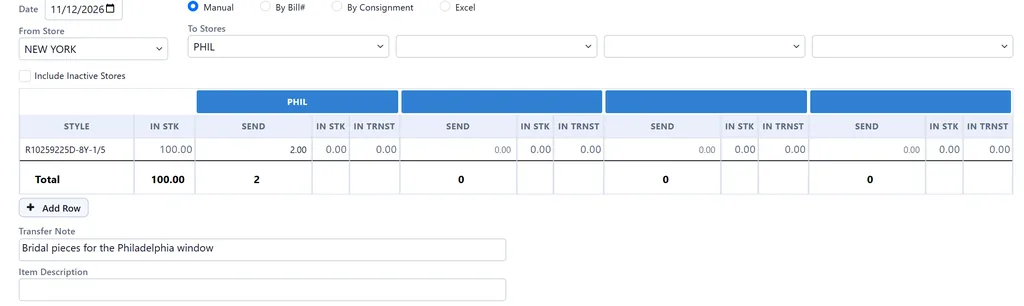
Send Items To Stores sends pieces from one store to up to four others in one entry. Type the styles in, or take them from a vendor bill, a consignment or an Excel file. The transfer prints with pictures and barcodes, and you can list open transfers, every transfer, or the transfers of one style. If you want the receiving store to confirm, transfers can be set to stay in transit until it checks off what arrived.
No. There is one customer file for all your stores, so a customer's purchases, repairs, layaways, store credit and loyalty points follow them to any store. Each customer also has a home store, and a salesperson can be limited to their own store's customers.
Yes. Each store has its own sales tax rate, and every sale takes the rate of the store it was made in. The sales tax report runs by store. Each store also has its own address and logo, card merchant account, bank accounts, cash registers and invoice fine print.
Yes. Each user has a home store. You can pin a user to it, so they cannot switch to another store, and limit them to that store's customers. Salespeople sign in to a store and a cash register.
Yes. Sales, profit, end of day, cash registers and sales tax report by store or for all stores. In accounting each store is its own department, so the trial balance, income statement and balance sheet run for one store or the whole company. If you use QuickBooks Online instead, each store becomes a QuickBooks class.
Yes. Start a 30-day free trial, or book a live demo and we will set up your stores and walk through a transfer and the store reports with you.
We will set up your stores, send a transfer between them and run the store reports with you. Free demo, 30-day free trial, and unlimited training included.
Prefer to talk? Schedule a meeting or call (646) 578-8300.Published: · Last updated: