General Ledger
Your chart of accounts, automatic posting, journal entries, and statements by store.
The general ledger →Every sale, payment, bill and repair already in WJewel reaches its own general ledger. Pay vendors and print checks, send customer statements, download and reconcile your bank, and see a profit and loss for each store, with no second program and no retyping. Prefer QuickBooks? WJewel syncs with QuickBooks Online too.
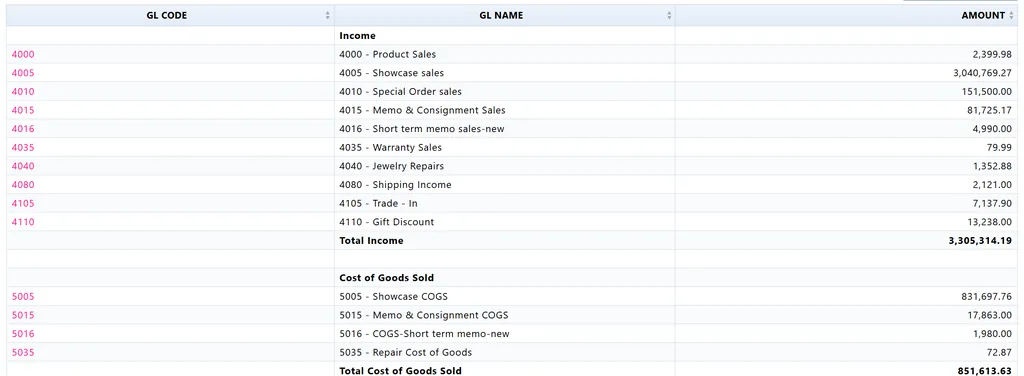
Your chart of accounts, automatic posting, journal entries, and statements by store.
The general ledger →Vendor bills and checks; customer statements, aging and finance charges.
Payables and receivables →Bank accounts, deposits, downloaded bank transactions and bank reconciliation.
Banking →Showcase sales, special orders, memo and consignment, repairs and trade-ins each reach their own accounts, with their cost of goods, because the sale and the books are the same program.
Connect your bank account, download its transactions into WJewel, and match them in Bank Reconciliation, with no retyping from the statement.
Use WJewel’s own books, or send your sales to QuickBooks Online and keep everything else there. Either way, nothing is typed twice.
Invoices with their payments, and returns as credit memos. Customers are matched or created in QuickBooks.
WJewel’s general-ledger entries, carrying your sales, inventory and cost-of-goods amounts, with each store as a QuickBooks class.
Send it when you want, or let it run every night on its own.
QuickBooks and jewelry software →The accounting is not a separate program fed once a month. Each step below happens in WJewel, on the same data.
Step 1
Sales, layaways, repairs and deposits post to sales, receivables, cost of goods and inventory.
Step 2
Count the drawer, run the end of day, and deposit the takings.
Step 3
Vendor bills from the invoice, then checks for one vendor or all of them.
Step 4
Statements out by email with a link to pay, and aging to see who is late.
Step 5
Download the bank’s transactions and match them, account by account.
Step 6
Trial balance, income statement and balance sheet, by store or for the company.
From verified reviews of WJewel on Capterra.
“WJewel covers everything we need to run our jewelry store in one system — invoicing, repair orders, inventory, scrap gold buying, and full accounting (AP/GL) without needing separate software. … It’s clearly built by people who understand the jewelry trade — things like karat/metal tracking, style-level costing, and repair workflows work the way a real store operates, not like a generic retail POS with jewelry features bolted on.”
“Very easy to use. Everything from invoicing, putting in inventory levels, the accounting system, are integrated making business functions and analysis very straight forward and easy. There is also a seamless linking of everything in inventory to the web.”
“WJewel is always receptive and quick to respond when needing support. When learning the program, they explained each feature step by step. … Our company mainly uses it to track inventory, create invoices & end of month statements, track expenses, and enter payables.”
“Complete system of tracking gold buying receiving tagging distributing in 1 step”

4.8 out of 5 from 73 verified reviews on Capterra
Ease of use 4.8 · Customer service 4.9 · Read the reviews


WJewel has full accounting built in: a general ledger with your own chart of accounts, payables and check printing, customer statements and aging, bank accounts and bank reconciliation, with a trial balance, income statement and balance sheet. You can run the whole business on it with no separate accounting program. If you or your accountant prefer QuickBooks Online, WJewel sends your sales there instead.
Your invoices with their payments, returns as credit memos, and WJewel's general-ledger entries as journal entries, which carry your sales, inventory and cost-of-goods amounts. Customers are matched or created, and each store becomes a QuickBooks class. Send it when you choose, or every night on its own.
Yes. Connect your bank account, download its transactions into WJewel, and match them in Bank Reconciliation, with no retyping from the statement. You can also import a bank statement from Excel.
Yes. Pay one vendor's bills or every vendor you owe at once, write a check without a bill, and print on check stock, plain or with a MICR line, with the check at the top, middle or bottom of the page. The check register lists them all, and a check can be reprinted or cancelled. Vendors can also be paid by credit card.
Yes. Set your default accounts once, and invoices, payments, bills, memos and consignments post to the general ledger as they are saved, with cost of goods and inventory. Pawn loans and kitty plans have their own accounts. Add your own journal entries for anything else.
Yes. Each store is a department in the general ledger, so the trial balance, income statement and balance sheet run for one store or the whole company. See multi-store jewelry software.
Yes. Print or email statements for one customer or all of them, with a link to pay online, and schedule them to go out on their own. Aging reports show who owes what and for how long, and finance charges can be worked out for overdue balances.
Yes. The wholesale and manufacturing program has the same general ledger, payables, receivables, banking, bank downloads and QuickBooks Online sync, and adds payroll: withholding tables, payroll checks, quarterly reports and W-2s.
Yes. Set a date before which nothing can be changed, and bills, bank transactions and other entries dated before it are locked.
We will import your chart of accounts, walk through a day’s sales to the financial statements, and reconcile a bank account with you. Free demo, 30-day free trial, and unlimited training included.
Prefer to talk? Schedule a meeting or call (646) 578-8300.Published: · Last updated: