Take It In
A numbered ticket with photos, your repair prices, a promised date, the deposit and a barcoded claim.
Repair take-in →Take a repair in on one screen, with photos, the price, a promised date and a deposit. Follow the job bag from jeweler to jeweler, text or email the customer when it is ready, and turn the pickup into an invoice. All in the same program as your POS, inventory and books.
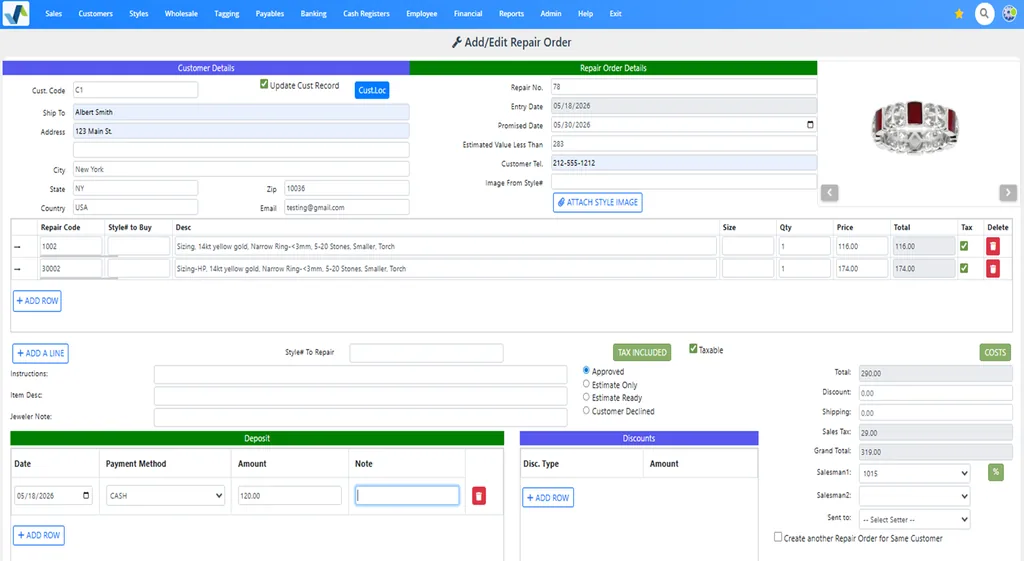
A numbered ticket with photos, your repair prices, a promised date, the deposit and a barcoded claim.
Repair take-in →Job bags given to each jeweler with a due date, their full history, bench time and what is past due.
Job bag tracking →Text or email the customer when it is ready, show it in their portal, and turn the pickup into an invoice.
Pickup and payment →Everything the envelope used to hold, typed once and kept for good, so anyone at the counter can answer “is my ring ready?”

Set your repair prices once, and every salesperson quotes the same price for the same job.
Each code has its description, regular price and rush price, and its cost in labor, material and overhead. Arrange them in levels, and import or update the whole list from Excel.
Add your own custom repair codes, or use Geller Blue Book repair codes. Print a sheet of barcodes for your most common repairs.
Not sure what it needs? Save it as an estimate only, mark it estimate ready when the jeweler has looked, and approved or declined once the customer decides.
Give each job bag to a jeweler, setter or polisher with a due date, and take it back when the work is done. WJewel keeps every step.
Fewer “is it ready yet?” calls, and no repair that sits in the drawer for months.
When the job is marked ready for pickup, text or email the customer in your own words. Texts go only to customers who agreed to receive them.
Customers see their open repairs, status, promised date, deposits and balance, pay toward a repair online, and get a ready-for-pickup notice.
Customer portal →The pickup becomes the repair invoice, with the deposit already applied. Refunds and warranty repairs are handled there too.
Customers drop off or pick up a repair on a tablet at your counter, and sign on screen. The signature is filed with the repair.
Self check-in →A repair department should make money. WJewel shows you whether it does.
Record the labor and parts used on each job bag: the part, quantity, weight, cost and price.
Bill a trade shop’s work to the job bag from its invoice. A.I. can read that invoice and fill in the bill for you.
The Repair Cost vs Charge report shows the charge, cost and margin for each job and repair type, and the costs post to your general ledger.
Step 1
The customer, photos, the work from your price list, a promised date and a deposit, on one screen or the check-in tablet.
Step 2
The customer takes the barcoded claim; the piece goes into its barcoded job envelope.
Step 3
From any store to your shop or another store, and received there, so you always know where it is.
Step 4
Each jeweler gets the job bag with a due date, and records the labor and parts used.
Step 5
Completed and ready for pickup, with a text or email to the customer.
Step 6
The pickup becomes the invoice, the deposit is applied, and the sale and its cost reach your books.
Repairs are part of WJewel’s complete jewelry store software, on the same customers and the same books.
Sales, layaways, special orders, trade-ins and store credit at the same counter where repairs come in.
Jewelry POS system →A watch repair is a repair order like any other, and the watch’s own details live on its style.
Watch store software →Repairs, stock and sales across all your stores, with transfers between them and reports per store.
Multi-store software →Repair sales, deposits and costs post to WJewel’s own general ledger, or reach QuickBooks Online.
Jewelry accounting software →From verified reviews of WJewel on Capterra.
“We are thrilled with the product! It covers all aspects of our business (and then some!) … It allows us to track our repairs from start to finish!”
“As a small custom design and jewelry repair shop we have pretty unique needs and we were stuggling to find a solution out of the box. We came across wJewel and signed up for a free demo and knew we’d found our answer. … Today, we are printing our shop jobs on 4x6 index cards and using reusable job envelopes. This feature alone has saved us from having to order/stock custom job envelopes and from hand writing repair jobs!”
“WJewel covers everything we need to run our jewelry store in one system — invoicing, repair orders, inventory, scrap gold buying, and full accounting (AP/GL) without needing separate software. … It’s clearly built by people who understand the jewelry trade — things like karat/metal tracking, style-level costing, and repair workflows work the way a real store operates, not like a generic retail POS with jewelry features bolted on.”
“Very professional appearance that leaves customers feeling comfortable and at ease with repairs and receipts that allow clear understanding. So many detail options that allow a company to start simple and grow with time and need.”

4.8 out of 5 from 73 verified reviews on Capterra
Ease of use 4.8 · Customer service 4.9 · Read the reviews


It replaces the paper envelope and the repair book. Each repair gets a numbered ticket with the customer, the piece, photos, the work and the price, a promised date and any deposit. The job bag is tracked from the counter to the bench and back, the customer is told when it is ready, and the pickup becomes an invoice. In WJewel all of that is part of the same program as your POS, inventory and books.
Yes. Take a picture with the computer's camera, paste one in or attach a file, and it is saved with the repair order, next to any scanned documents. The ticket also records an estimated value and any instructions for the jeweler.
From your own list of standard repair codes, each with its regular price, a rush price and its cost in labor, material and overhead. Import the list from Excel, add custom codes, or use Geller Blue Book repair codes. You can still type any price on a line, and add stones or findings from stock to the same repair.
Yes. When the jeweler marks the job completed and ready for pickup, choose to text or email the customer, using your own wording. Texts go only to customers who have agreed to receive them. Customers with a portal login can also see the repair's status and pay toward it online.
Each job bag is given to a jeweler with a due date and taken back when the work is done, and WJewel keeps the history: who had it, when it was given and returned, which store or shop it was in, and who recorded it. Reports list the open jobs for each person, the past-due ones, the jobs ready for pickup, and promised against completed dates.
Yes. Record the labor and parts used on each job bag, and bill outside work to it from your vendor's invoice. The Repair Cost vs Charge report then shows the charge, the cost and the margin for each job and repair type, and the costs post to your repair cost-of-goods accounts.
Yes. Send repairs from any store to the shop or to another store, receive them back, and list the jobs at any location, so the store that took the repair in always knows where it is.
Yes. Start a 30-day free trial, or book a live demo and we will take in one of your own repairs with you, from the ticket to the pickup.
More on running a repair department: Jewelry repair tracking
We will load a few of your repair prices and take in a repair with you, from the ticket to the pickup. Free demo, 30-day free trial, and unlimited training included.
Prefer to talk? Schedule a meeting or call (646) 578-8300.Published: · Last updated: