New in WJewel: Payment Links, a Customer Portal, Phone Scanning and More
We have added nine new features to WJewel. A few are for the counter, a few are for the back office, and all of them work for both a retail store and a wholesaler or manufacturer. Here is what each one does.
- Text-to-pay links — get paid by credit card without the customer coming in.
- Customer portal — customers check their own account and pay online.
- Ask AI — ask a question in plain English, get the answer from your own data.
- Runs in your browser, on any device — PC, Mac, iPad, iPhone, Android.
- Your phone is a barcode scanner — build invoices and memos from your phone.
- Bank transactions, downloaded — reconcile without retyping.
- Scheduled tasks — statements and reports that send themselves.
- Forecasting: how many to order — a quantity for every style.
- The WJewel API — connect your website and other software.
Get Paid by Text or Email
When a customer owes you money and is not standing at your counter, you no longer have to read card numbers over the phone or wait for a check. Send a secure payment link from WJewel by text or email. The customer opens it on their phone or computer and pays by credit card in a few taps.
For a retail store, that might be the balance on a repair or a special order. For a wholesaler, it is the account that keeps promising the check is in the mail.
The Customer Portal
Much of the phone traffic into a jewelry business is customers asking about their own account: what they owe, what is open, whether the repair is done. The customer portal lets them look it up themselves, any time, from any device.
- Retail customers can check their statement, open layaways, repairs and special orders, and make payments.
- Wholesale accounts can see their orders, statements, open invoices and repairs, and make payments.
Your staff get fewer “what do I owe?” calls, and your customers get answers at 10 p.m. without waiting for you to open.
Ask AI: Ask Your Business a Question
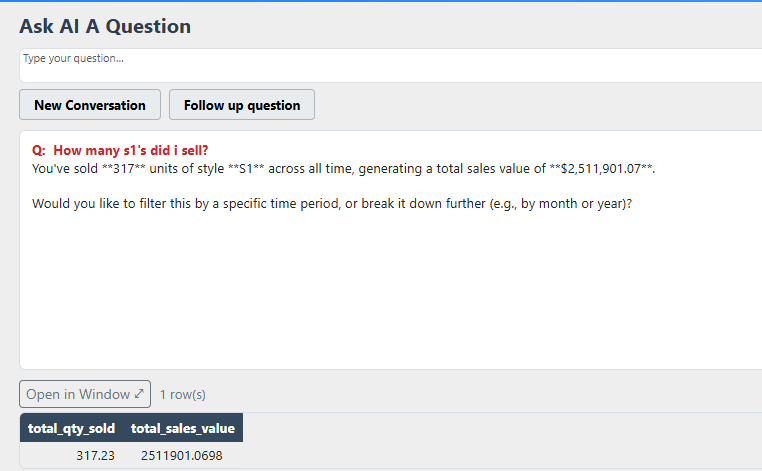
Ask AI is built into WJewel. Type a question the way you would say it out loud — “what hasn’t sold in over a year?”, “who are my top 20 customers this year?” or “which vendor gives me the best margin?” — and get the answer from your own live data in seconds. Then keep going with follow-up questions, the way you would with a person. It reads only your own records and honors each user’s permissions.
Runs in Your Browser, on Any Device
The web version of WJewel runs in Chrome, Safari and other popular browsers on PC, Mac, iPad, iPhone, and Android phones and tablets. There is nothing to install. It is the full program, not a cut-down companion app, so the owner can check the day from home and a salesperson can look up a customer from the trade-show floor.

Your Phone Is a Barcode Scanner
WJewel can use your phone’s camera to scan barcode tags. Scan pieces to build invoices, memos and more, right where the jewelry is: on the sales floor, in the vault, or at a booth. You do not need a handheld scanner for every person on the floor.

Bank Transactions, Downloaded
WJewel now downloads your transactions directly from your bank, so you can reconcile your accounts inside WJewel without retyping anything from a paper or PDF statement.
Scheduled Tasks
Some jobs need doing on the same day every week or month: sending customer statements, emailing inventory reports to the owner or a buyer, and others. With scheduled tasks, you set each one up once and WJewel runs it automatically on the schedule you choose. Nobody has to remember to do it.
A job can email every customer with a balance their own statement, email a report, run a QuickBooks Online sync, or send alerts about past-due memos, credit limits and aging. A test-run setting sends everything to your own address first, so you can check it before it goes to customers.

Forecasting: How Many to Order
WJewel’s demand forecasting already projected what was likely to sell by style, category and vendor from your own sales history. Now it also shows how many of each style to order to meet upcoming demand.
For a retail store, that is a quantity for every line on the reorder and the seasonal buy. For a wholesaler or manufacturer, it is how many of each style to order or make before the casting run, so you are not short on best sellers or overstocked on slow ones. More on forecasting for wholesale and production.
The WJewel API
The WJewel API lets other software work with WJewel directly. For example, your website can add a new customer to WJewel when someone signs up, or check whether a piece is in stock. Other software you use can do the same. If there is something you want to connect, tell us what it is.
Quick Answers
Do these features work for both retail and wholesale?
Yes. All nine work for retail stores and for wholesalers and manufacturers. The customer portal shows each kind of customer what matters to them: retail customers see their statement, open layaways, repairs and special orders; wholesale accounts see their orders, statements, open invoices and repairs. Both can make payments.
How do customers pay with a payment link?
By credit card. You text or email the link from WJewel, the customer opens it on their phone or computer, and pays in a few taps.
Do I need to install anything to use WJewel on a phone, iPad or Mac?
No. The web version runs in Chrome, Safari and other popular browsers on PC, Mac, iPad, iPhone, and Android phones and tablets. Sign in and you are working in the full program.
I already use WJewel. How do I start using these?
Call us at (646) 578-8300 or email info@wjewel.com, and we will walk your team through whichever ones you want to use first.
See Them on Your Own Business
The quickest way to judge these features is to see them working with your own customers and stock. Book a demo, or start a 30-day free trial for retail or wholesale.
About the author
Javid Ishal · Architect of WJewel
Javid Ishal is the architect of WJewel and a cum laude graduate of Columbia University. He has advised jewelry businesses on operations and software since 1987, including work with brands such as Gabriel & Co., Effy and Imagine Bridal.
Related WJewel pages
- Jewelry POS System Point of sale built for jewelers — sales, repairs, layaways, trade-ins, EMV and multi-store.
- Jewelry Retail Software The full retail platform: POS, CRM, appraisals, custom orders and store management in one system.
- Software for Wholesalers & Manufacturers Memo, invoicing, EDI, production tracking and diamond inventory for wholesalers and manufacturers.
- Pricing Plans from $99/month. No setup fees, no long-term contract, 30-day free trial.
- Book a Free Demo See WJewel running on your own workflow. 30 minutes, no obligation.
WJewel has been built and supported by Ishal Inc. in New York since 1987, and is used by jewelry retailers, wholesalers, manufacturers and diamond dealers across the US. Read customer reviews or see the FAQ.
Published: · Last updated: