Collector Wanted List
What each collector is looking for, and the watches in stock that fit, with an e-mail to tell them.
How matching works →Keep every collector's wanted list and see which watches in stock fit. Know where every watch is and who has it. Keep its provenance, inspection and papers, see its days in stock and margin, and hand out a one-page spec sheet. All in the same program as your point of sale, repairs and books.
On top of the serialized watch inventory, repairs and online selling of our watch store software.
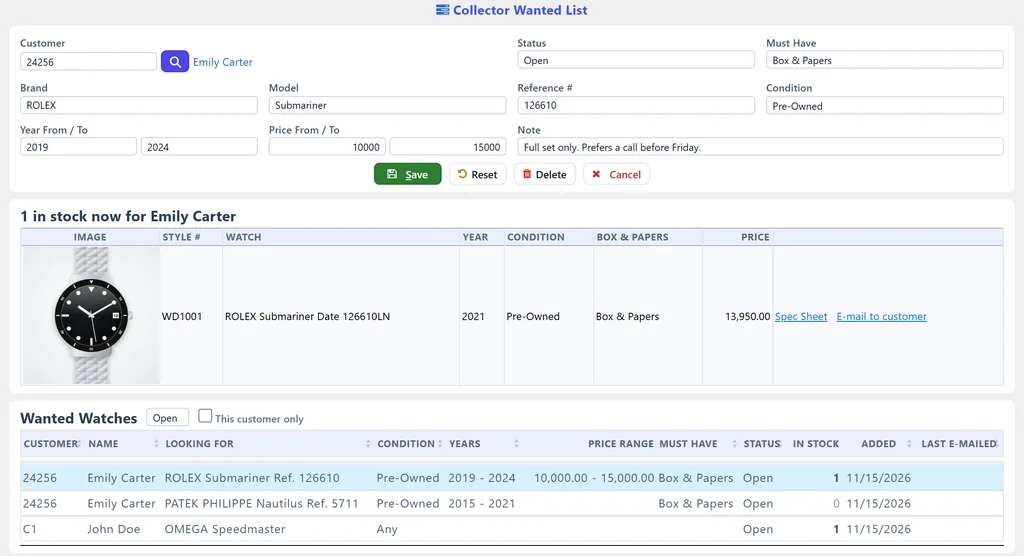
What each collector is looking for, and the watches in stock that fit, with an e-mail to tell them.
How matching works →Where every watch is when it leaves the safe, who has it, and when it is due back.
Track every watch →Provenance, warranty, service history, an inspection checklist, and the watch's papers and photos.
What it keeps →Days in stock and margin, an insurance schedule, and the profit on every watch you sold.
See the reports →One page with your logo, the picture and every specification, for a collector or another dealer.
See the spec sheet →Short, long and HTML descriptions written from the watch's own specifications, nothing made up.
How it writes →About three minutes, recorded in WJewel with demo watches and made-up customers: a serialized watch, a collector's request and its match, an A.I. listing, custody, history and papers, a sale, the aging and insurance reports, and the spec sheet.
Chapters and transcript on the video's own page
Watch the video
Tell us who you are so we can follow up.
We use your details to follow up about WJewel. No spam.
Your best buyers ask for watches you do not have yet. Write each request down once, and WJewel tells you the moment a watch that fits is in stock.

A single watch can be a large share of your capital. When one leaves the safe, write down where it went, and WJewel keeps the trail.
A buyer of a pre-owned watch wants to know where it came from and what was checked. Keep the answers with the watch.


Know which watches are earning their place in the safe, and which have sat too long.
Send a collector or another dealer everything about a watch on one page, and let WJewel draft the listing for you.

Each step happens in the same program, on the same watch.
Step 1
Buy the watch from the public or take it in trade, and record its reference, serial number, condition, box and papers and specifications.
Step 2
Tick the inspection checklist, note the provenance and service history, and attach the receipt, the papers and the photos.
Step 3
See which collectors are looking for one like it, and send them the spec sheet in one click.
Step 4
Record it going to the showroom, a show or a customer, and have A.I. write the listing for your website, eBay or Etsy.
Step 5
Sell it at the counter with split payments, layaway or a trade-in, or online, and it leaves your stock.
Step 6
See its profit and days to sell, the watches still waiting for a buyer, and the value of the rest for your insurer.
The dealer tools sit on WJewel's complete watch store software and jewelry store software.
Brand, model, year, reference and serial number, box and papers, and the case, dial, movement and bracelet.
Watch store software →Split payments, layaways, trade-ins and store credit, and Jewelers Mutual care plans on watches.
Jewelry POS system →Repair orders, job bags, and a text or e-mail when the watch is ready for pickup.
Repair software →Watches taken in on consignment, several stores, and built-in accounting with a QuickBooks link.
Consignment software →From verified reviews of WJewel on Capterra.
“We have been in the jewelry industry for over 25 years, and tried 2 other software packages before switching to this software. Ease of use and customer support are amazing, Software was designed by people who know the jewelry industry inside out, we did not have to adapt to the software, the software adapted to our needs.”
“Complete system of tracking gold buying receiving tagging distributing in 1 step”
“great people to work with. always willing to help if you need it. and i especially like how they will customize and tweak the program to make it do things i would like it to do specifically for me … simple to learn and use. great value for the money”
“Runs my entire operation, day in, day out. … WJewel programmers have the capability to adjust and customize anything you need. If you dream it, they can program it..”

4.8 out of 5 from 73 verified reviews on Capterra
Ease of use 4.8 · Customer service 4.9 · Read the reviews


Independent dealers who buy and sell pre-owned and luxury watches, and jewelry stores with a watch counter. They are part of WJewel's jewelry store program, on the same watches, customers and sales as the rest of the store, so there is nothing to export or keep in step.
A watch in stock fits a collector's request when the brand is the same, its model contains the model asked for, and its reference number starts with the one asked for (spaces, dashes and dots are ignored, so 126610LN, 126610-LN and 126610 all fit "126610"). The condition must match (Pre-Owned also takes Certified Pre-Owned), the year and price must be inside the collector's range, and it must have the box and papers they insist on. A watch with no year or price on file is not left out.
Yes. Each matching watch has an E-mail link that sends the customer its spec sheet as a PDF, with the price and only the last four digits of the serial number. The request then shows as Found, with the date and the watch you sent. It is not sent to a customer with no e-mail address or one marked Do Not Email.
No. It is a record of where a watch is and who has it: the showroom, a trade show, a watchmaker, a memo, a customer looking at it. Moving stock from one store to another is still done with Send Items To Stores, so your store inventory stays exact.
No. WJewel keeps your own inspection and the papers that back it: the 12-point checklist, the timing readings, who inspected the watch and when, the provenance, the service history, known replacement parts and discrepancies, and the documents and photos you attach.
The insurance schedule uses each watch's replacement cost, and its retail price when no replacement cost is filled in. It lists every watch in stock with its serial number, condition, box and papers and where it is, ready to print or send as a PDF or Excel file.
No. It writes the short, long and HTML descriptions only from what is on the watch's Watches tab and its picture. It never invents a reference number, a year, a calibre, a material or a service history, it asks before replacing descriptions already there, and nothing is saved until you check the text and save the watch.
Not yet. WJewel lists a watch on eBay or Etsy from the program and sells through Shopify or your own website from the same inventory, but it does not sync with Chrono24 or other watch marketplaces today. Ask us if a marketplace matters to you.
Yes. Start a 30-day free trial, or book a live demo and we will set up a few of your own watches, a collector's request and a spec sheet with you.
We will set up a few of your watches, a collector's request and a spec sheet with you. Free demo, 30-day free trial, and unlimited training included.
Prefer to talk? Schedule a meeting or call (646) 578-8300.Published: · Last updated: